Giant Bed
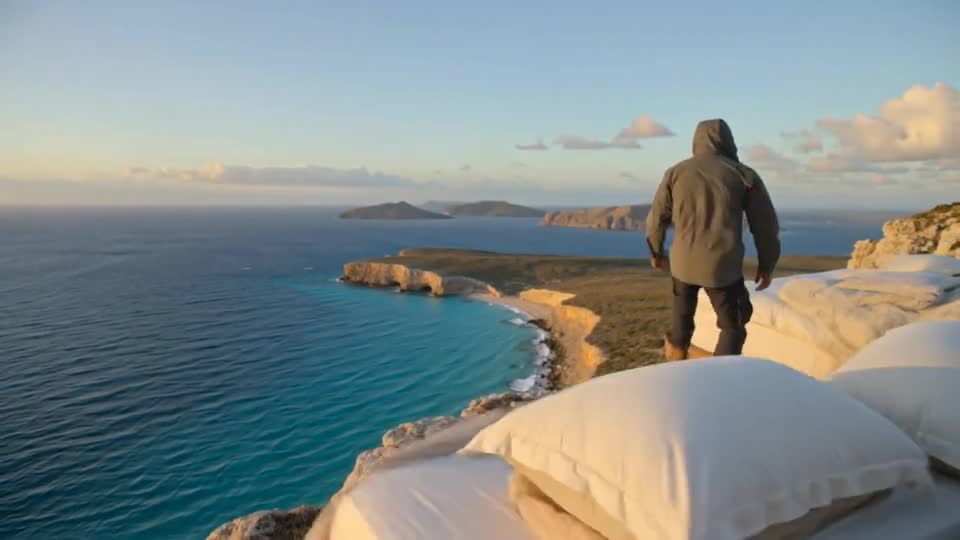
Shrink your subject onto an enormous, cozy bed for a dreamy, oversized-world scene.
Video generation is not available on Pumio yet. Join the waitlist for a launch notification.
A tiny you in a giant world
Giant Bed places your subject on an oversized bed with pillows the size of hills. The slow reveal of scale makes it a favorite for cozy, dreamy edits.
Try Giant BedPick a relaxed pose
Photos of someone lying down, sitting or curled up fit the scene best. Pets napping on a sofa are a perfect starting point.
Style the bedroom
Change the blankets, the light or the room in the prompt: crisp white hotel linen, a pastel kids’ room or a moody blue night.
Try: “A tiny kitten curled up on a giant bed of white linen, sunlight through sheer curtains, a slow pullback.”
How to make a Giant Bed video
Three steps from your image to the finished clip.
Upload a photo of a person or pet with a clear outline
Upload a photo of a person or pet with a clear outline.
Keep the giant bed prompt or change the bedroom style
Keep the giant bed prompt or change the bedroom style.
Generate the clip and check the sense of scale
Generate the clip and check the sense of scale.
Good to know
- Scale can look inconsistent if the subject is cropped tightly.
- Hands and paws may change shape on the soft blanket.
- Busy original backgrounds can leak into the scene.
More templates to try
Browse all templates →
Giant Bed: questions and answers
Does it work with pets?
Yes. Sleeping or relaxed pets are some of the most popular subjects.
Can I choose the bedroom style?
Yes. Describe the room, colors and light in the prompt.
Why does the camera pull back?
The pullback reveals the scale of the bed, which is what makes the effect work.
Can I generate this on Pumio now?
Online generation is not open yet. You can preview an image locally and join the optional email waitlist for a launch notification.
Make your own Giant Bed video
Upload an image and let the template do the rest.
Try Giant Bed